

What’s Important to Know
- Google has introduced notifications in the Play Store that indicate when certain apps may significantly impact your phone’s battery life.
- This initiative relates to a new standard called the Excessive Partial Wake Lock threshold, which assesses how much power an app consumes in the background and alerts users about excessive usage.
- The Play Store is also equipped to alert users about apps that have generated complaints based on feedback from comparable devices.
With battery life being a crucial aspect of smartphone usage, Google is taking steps to inform users about apps that could unknowingly drain their device’s power. Recently, the company has begun issuing warnings for such apps in the Play Store.
These notifications are prominently displayed in a noticeable reddish tone that reads, “This app may use more battery than expected due to high background activity.” Google emphasizes the “background activity” part to encourage developers to improve their apps’ efficiency. Further information on this initiative was shared in a blog post on the Android Developers site.
This alert is part of the new Excessive Partial Wake Lock policy designed for Android devices. If the app’s background usage stays within acceptable limits, users won’t see any warnings. However, if an app surpasses its defined background usage threshold, users will receive a warning about its power consumption.
Google clarifies that “poor performance” is identified by whether an app maintains a ‘non-exempted partial wake lock for at least two hours on average while the screen is off in more than 5% of user sessions over the last 28 days.” While certain wake locks are essential, many apps misuse this feature, and Google aims to address this inefficiency. By alerting users upfront, they can make informed decisions about which apps to install. These notifications have been visible in the Play Store since March 1.
User-Centric Alerts
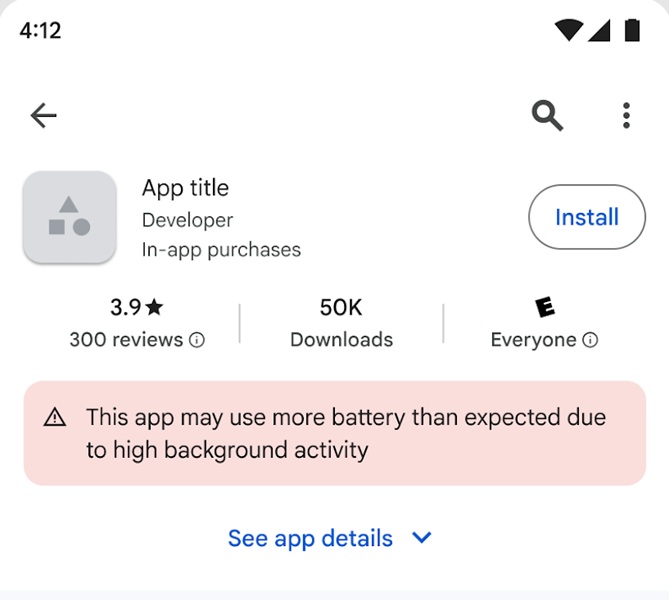
Last fall, Google announced plans to implement these warnings to help users maintain their battery life. Collaboration with Samsung resulted in the metrics used for this threshold, ensuring accurate performance assessments based on real-world data.
Beyond just informing users about battery drain, the Play Store has also been updated to alert users to potential technical issues with apps. The system leverages feedback from similar devices to highlight apps that experience frequent crashes or other significant problems, enabling users to make better choices before downloading.
Key Takeaways
- Google’s warning system aims to reduce unnecessary battery consumption by informing users about heavy background activity.
- Developers are encouraged to optimize their apps to meet Google’s standards for efficiency.
- Alerts regarding performance issues are also part of the Play Store update, helping consumers stay informed.
- By being proactive, users can take charge of their device’s performance, choosing apps wisely to enhance their experience.