

This week, Apple rolled out the latest version of its operating system, iOS 26.3, enhancing the user experience for iPhone owners. Among the notable additions are improvements aimed at fostering compatibility with Android devices and enhanced privacy options. Let’s explore the highlights of this new software update.
What’s New in iOS 26.3
Easier Switching to Android
A significant innovation in iOS 26.3 is the “Transfer to Android” feature, designed to streamline the process for users shifting from iPhone to Android. Developed in collaboration with Google, this system simplifies how users can move their data when switching platforms.
Anyone transitioning from Android to iPhone will also benefit from updated options on the Android side. By placing the devices next to each other, users can wirelessly transfer a variety of data, including photos, messages, and contacts, while even transferring the phone number seamlessly. However, it’s worth noting that sensitive data, such as health information and secured notes, will not carry over to the new device.
Enhanced Location Data Control
The latest update also introduces a feature allowing users to limit the precise location data shared with cellular networks. This new level of privacy control ensures that, instead of pinpointing a specific address, carriers may only identify users’ general neighborhood. To activate this feature, users must have compatible iPhone models and a suitable carrier.
New Features for Europe
In addition to improved notification management, several new functionalities are included in compliance with European regulations. They emphasize compatibility with a range of third-party devices and enhanced settings for NFC functionalities. These adjustments serve to create a more cohesive experience across diverse devices.
The EU has positively acknowledged these changes, highlighting their role in fostering a more interconnected digital environment for its citizens and promoting innovative solutions within the tech industry.
Updated Wallpaper Options
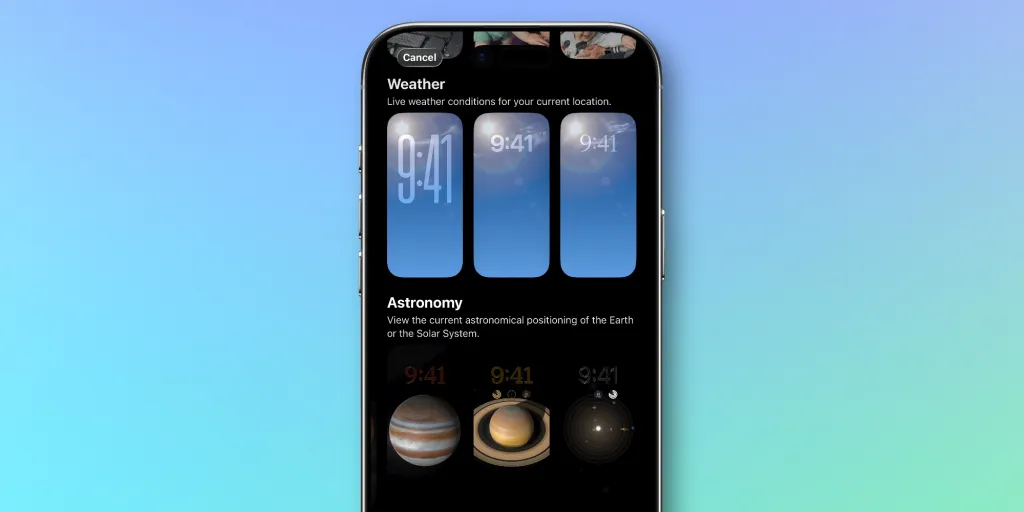
iOS 26.3 brings small enhancements to the wallpaper selection, dividing the previous Weather and Astronomy category into two distinct sections. While the wallpaper images remain the same, users can now enjoy new options in the Weather category that reflect current weather conditions at their location, along with Astronomy wallpapers that show celestial arrangements.
Security Enhancements
This update also addresses over 35 security vulnerabilities, underscoring Apple’s commitment to user protection, particularly after reports of one such vulnerability being exploited in the wild.
Conclusion on iOS 26.3
iOS 26.3 may be smaller compared to its predecessor, but it still offers valuable enhancements that could enrich the user experience. Running the latest version is quite simple—just navigate to your Settings app, select General, and tap Software Update.
Key Takeaways
- The “Transfer to Android” feature eases the process for users switching platforms.
- A new setting limits the precise location shared with carriers, enhancing privacy and user control.
- European regulations have spurred new features that improve interoperability for iPhone users.
- Wallpapers have been re-categorized, offering fresh options while retaining previous designs.
- The update includes security fixes for numerous vulnerabilities, reinforcing system safety.