

Breathing Life into an Old BlackBerry: A Nostalgic Experiment Gone Awry
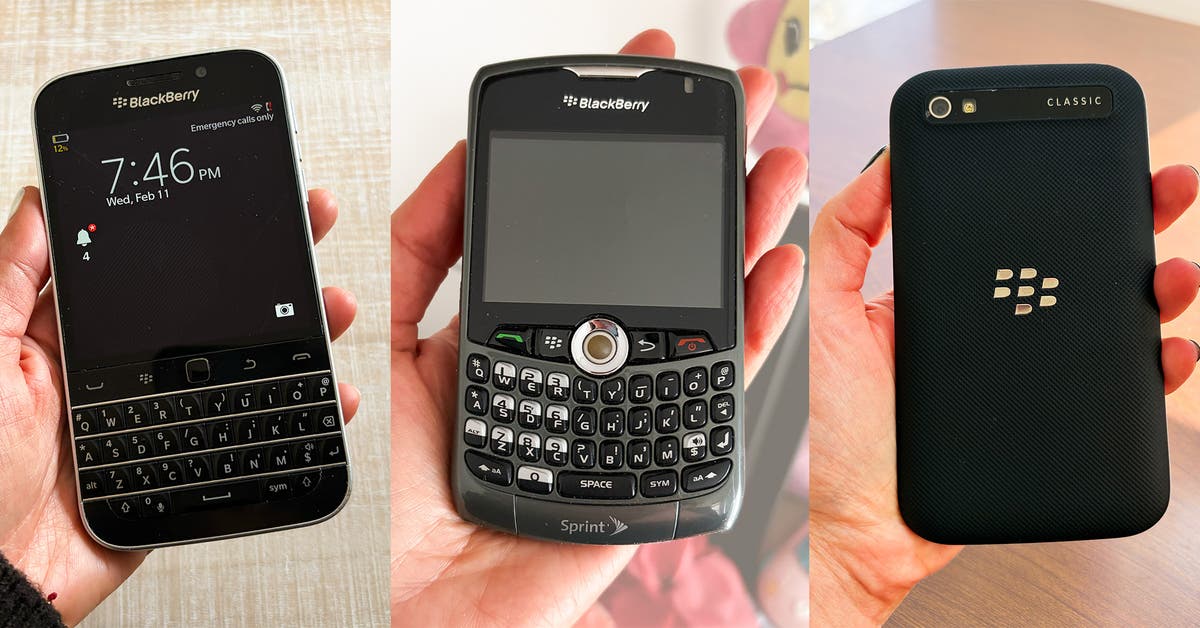
In a quest to reduce screen time, I embarked on the journey of reviving an old BlackBerry phone. Nostalgia in mind, I sought simpler communication. However, life with this vintage device took several unexpected turns.
The first challenge emerged when I realized my BlackBerry Curve operated solely on 3G networks—now obsolete. Eager to find a working model, I turned to eBay, only to find that many BlackBerrys have shifted to collector’s items rather than functioning gadgets. Guidance on what to consider when seeking a vintage phone highlighted that while a SIM card from a contemporary 4G or 5G device can work with a 2G BlackBerry, the transition toward 5G will render 2G networks less viable over time.
For a reliable option, the BlackBerry Classic Q20, which supports 4G LTE, became my target after the Curve failed.
Yet, the excitement of connecting didn’t last long. BlackBerry had shuttered its app store in 2019 and decommissioned its servers in 2022, meaning any device relying on its ecosystem could no longer send texts, make emergency calls, or access native applications.
However, there are potential workarounds. If you manage to secure a 4G-compatible BlackBerry, your current SIM card might work. But downloading apps requires a specific type of microSD card, along with a reader and a laptop.
Guidance from a YouTube channel offering tutorials and links to APK files for apps not available through conventional channels proved invaluable. Eventually, I succeeded in getting Instagram Lite and Google Maps onto my device. Yet, I could scroll through Instagram but couldn’t post, with each attempt causing the app to freeze.
The Google Maps experience provided mixed results when I sought directions. To compound the frustration, both apps crashed frequently, requiring a reset of my phone.
Despite initial optimism, it became evident that the BlackBerry couldn’t fully replace my primary device. I approached this experience convinced I could manage with basic functionalities like calls, texts, maps, and banking apps. However, anxiety about potential app failures during crucial moments deterred me from making a complete switch.
Moreover, using an outdated device raises various security concerns, as older models are generally more susceptible to hacking due to their lack of software updates safeguarding against vulnerabilities. For those with sensitive information, reverting to an old BlackBerry may not be the wisest choice.
Key Takeaways
- Consider Compatibility: Ensure a vintage BlackBerry is compatible with current 4G or 5G networks.
- Explore Alternatives: Opt for a model like the BlackBerry Classic Q20 to bridge some gaps.
- Plan for Limitations: Be prepared for reduced functionality, especially regarding apps, as many services have ceased.
- Understand Risks: Old devices can expose users to security vulnerabilities.
- Exercise Patience: Expect a learning curve and be ready for troubleshooting.
- Reflect on Needs: Evaluate whether the benefits outweigh potential challenges before switching to less modern tech.
This experiment provided insights into nostalgia and the challenges of technology’s rapid evolution.