

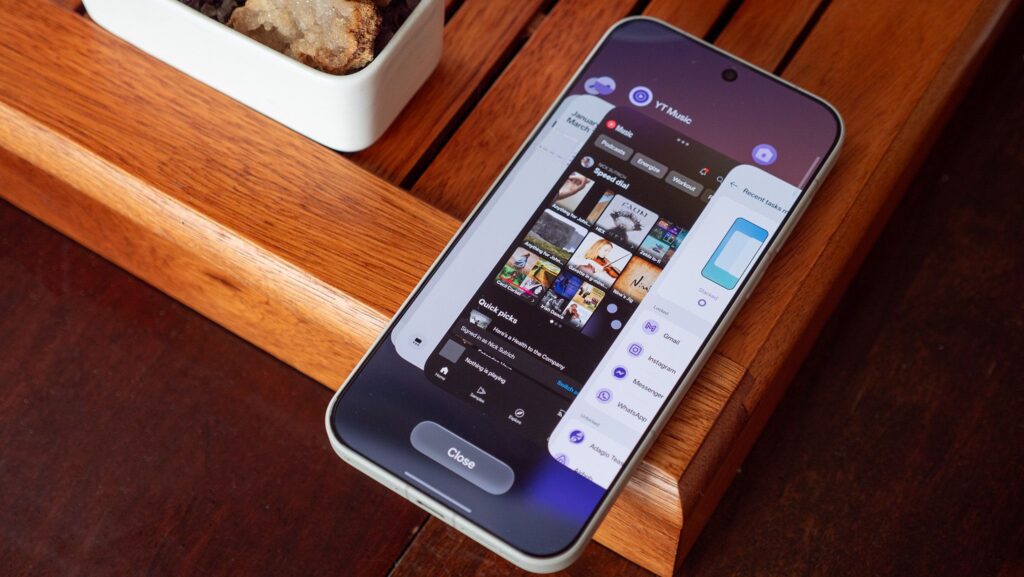
Upon reclaiming my recently tested OnePlus 15, I was taken aback by the updated Recents multitasking interface. What once was a distinctive design now felt like a derivative imitation of iOS, falling short compared to previous iterations. Struggling to revert to the classic style, my attempts to locate the option in the settings proved futile at first glance.
However, a deeper exploration revealed that the beloved “flat” design option still exists, albeit hidden from view. Many Android brands shifted to a stacked card format in their multitasking UIs recently, a significant upgrade over the basic Android version, but a notable downgrade from OnePlus’s prior layout, which many fans regarded as the best multitasking interface available.
Reinstating the Classic Task Switcher on Any OnePlus Device Running OxygenOS 16:
1. Access the Recents UI by tapping the Recents button on your navigation bar, or perform a swift swipe up on the home bar.
2. Press and hold the Close button.
3. Choose Flat from the options that appear above.
Alternatively, you can discover this settings menu by pinching the home screen, selecting home screen settings, and navigating to Manage Apps at the bottom.
Either method will restore the classic, lightning-fast multitasking interface that OnePlus is known for. Additionally, you can also “lock” an app in memory from this screen, keeping it easily accessible even amidst heavy multitasking.
Why OnePlus’s Classic UI Stands Out
Interestingly, many Android makers adopted a split notification shade and moved away from Google’s outdated multitasking UI, inspired by more intuitive designs seen on Apple devices. Yet, OnePlus chose to mimic this approach despite its previous success with a unique design.
Credit where it’s due: for users coming from an iPhone who may not adjust their settings extensively, this familiar layout might not have been an entirely misguided choice. Fortunately, OnePlus has retained its acclaimed multitasking UI; it simply requires a bit of digging to access. This setup might even feel like a challenge for tech-savvy users.
That said, it’s baffling why OnePlus would default to a less efficient option when their own solution was better suited for the multitasking lifestyle many users lead. The optimal blend would likely combine elements from both styles, allowing users to see stacked content while maintaining quick accessibility to frequently used apps.
The speed of the traditional OnePlus multitasking UI impresses users; the layout allows for rapid swapping between numerous apps, a feat that newer designs don’t replicate. The convenience of a row of icons available at the bottom enabled effortless transitions across apps with just a quick swipe and tap.
The current iteration, which echoes formats from brands like Samsung and Honor, only permits switching between two apps without requiring additional gestures. This limitation can frustrate users intent on smooth multitasking, making the return of the classic UI a welcome relief for those who thrive on speed and efficiency.
Key Takeaways
- Hidden Settings: Users can access the classic multitasking interface on the OnePlus 15 by navigating through less obvious settings, emphasizing the need for exploration in technology.
- User Adaptation: The move to replicate iOS may serve users transitioning from Apple devices, though many OnePlus fans appreciate familiarity over novelty.
- Speed Matters: The efficiency of the classic UI underlines the importance of speed in multitasking, a key selling point for OnePlus devices.
- Room for Innovation: Future iterations could benefit from merging the strengths of both traditional and modern designs for enhanced user experience.
- Community Feedback: Engaging users in discussions about UI changes is crucial, as their insights can drive better design decisions.