

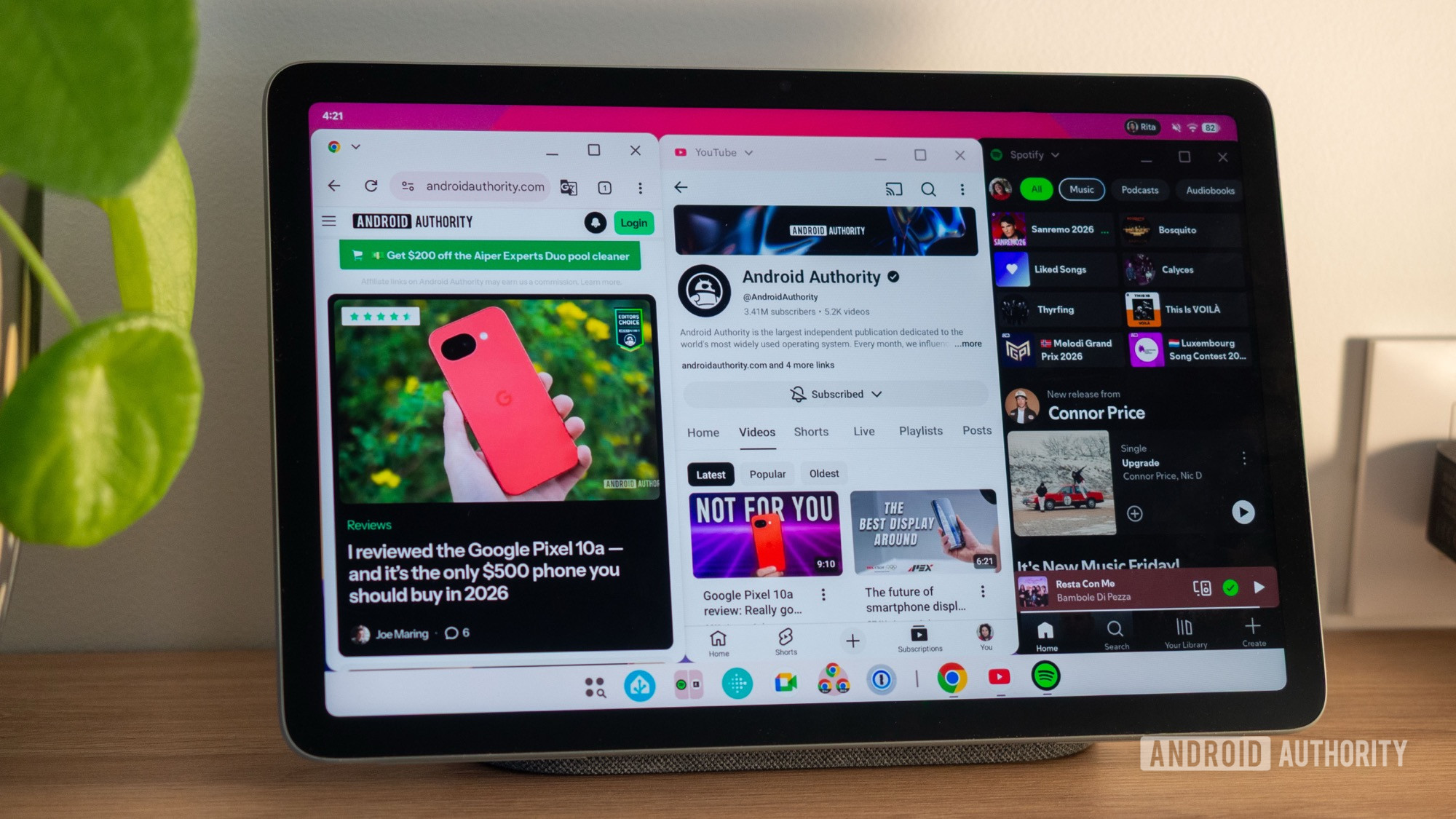
Android’s Desktop Windowing: A Tablet Game-Changer
Google has been integrating desktop-style window management into Android, a feature that has evolved since its introduction with Android Nougat. The latest iteration adapts Android devices for desktop use, turning tablets like the Pixel Tablet into productivity machines.
This functionality, known as “desktop windowing,” is included in the recent stable release of Android 16 QPR3 and is currently available on the Pixel Tablet. Future tablets running Android 16 QPR3 or the upcoming Android 17 are expected to support it as well.
An Impressive User Experience
Experiencing desktop windowing on the Pixel Tablet offers an intuitive and fluid interface that enhances multitasking capabilities. Users can position applications side by side, resize windows, and navigate between desktops, all while using familiar gestures.
The smoothness of app transitions and animations stands out. Resizing windows feels fluid, though precision may vary when using a touchscreen. The taskbar conveniently displays all open apps across various desktops for easy switching.
Making the Most of Features
The app switcher is well-designed, providing compact previews of active windows. Users can adjust two snapped windows simultaneously, enhancing multitasking. Launching new applications or switching tasks feels streamlined, whether by swipe or tap.
The interface includes familiar close, minimize, and maximize buttons in each floating app window. A dropdown menu near the app name allows quick access to features like split-screen mode or maximizing the app.
Seamless Coexistence of Modes
This new system’s flexibility allows users to stick with traditional full-screen apps or delve into the desktop experience, or even mix both modes. This adaptability facilitates swift transitions between applications without lag.
However, the interface can clutter the screen with multiple windows open, which may complicate navigation. A preference for one or two applications at a time helps maintain a cleaner workspace.
Room for Improvement
Despite advancements, inconsistencies remain. Moving applications between desktops is not as intuitive, and managing multiple instances of the same browser can pose challenges.
Key Takeaways
- Enhanced Multitasking: The desktop windowing feature supports multiple apps, improving productivity on tablets.
- User-Friendly Interface: Smooth transitions and clear navigation improve the user experience.
- Flexibility in Usage: Users can run apps in full-screen or desktop mode for personalized workflows.
- Potential Drawbacks: More than two open applications may clutter the interface.
- Future Updates Needed: Limitations in app management suggest areas need further refinement.
Android’s shift towards a desktop-like interface has the potential to transform tablet use. While the current features impress, continuous improvements are necessary for an optimal experience.